

Claude Skills Solve the Context Window Problem (Here's How They Work)
What they are, how they work, and when to use them over MCP

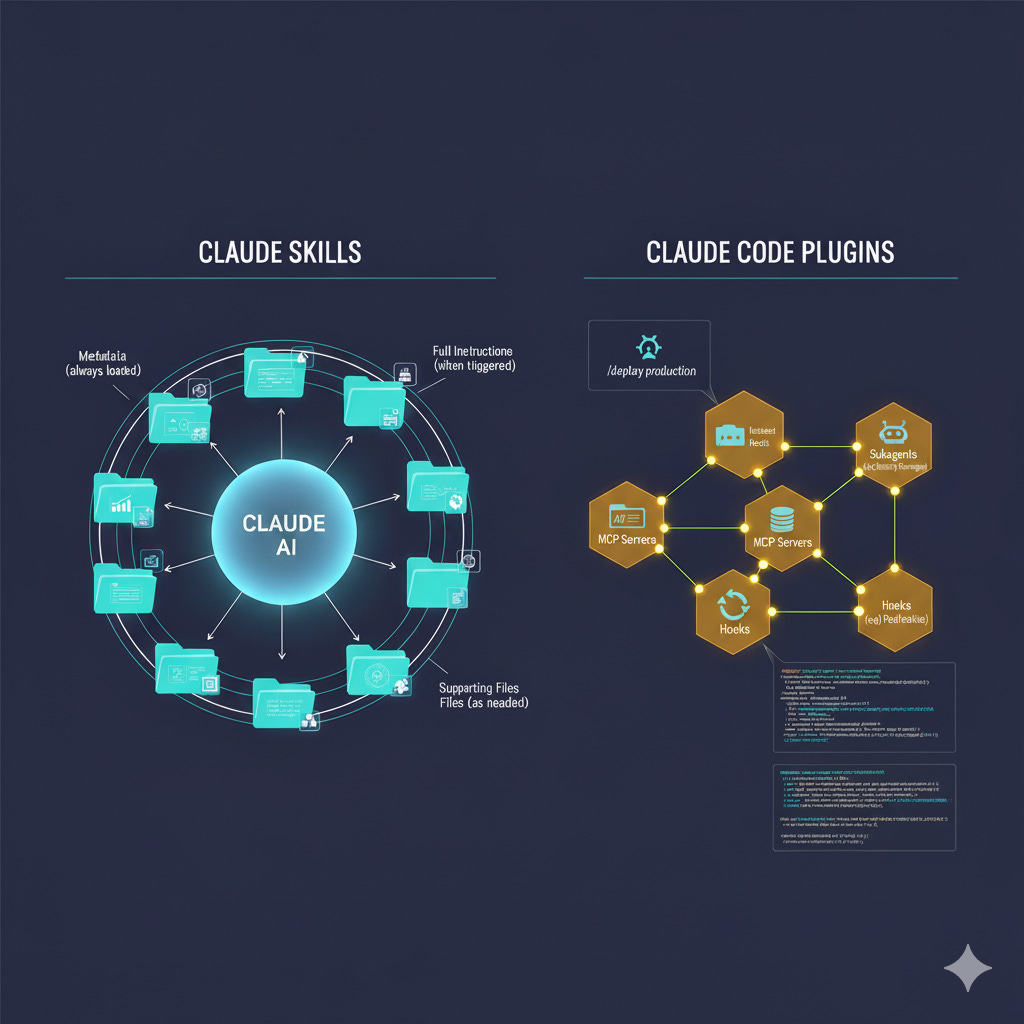
Anthropic just launched two features that solve a problem every developer using AI coding tools has been hitting: how do you teach an AI assistant your specific workflows without burning through your context window every single time?
Claude Skills and Claude Code Plugins, released in October 2025, take completely different approaches to the same core challenge. Skills turn Claude into a specialist by packaging expertise into folders it loads on-demand. Plugins transform Claude Code into an extensible platform where you can bundle and share entire development workflows.
The community response has been intense. Simon Willison called Skills “maybe a bigger deal than MCP.” Plugin marketplaces are already proliferating across GitHub. Within a week of launch, developers were creating curated collections with 80+ specialized sub-agents.
Here’s what you actually need to know about both.
The Real Problem These Features Solve
Every AI coding tool faces the same constraint: context windows. You can have the most powerful model in the world, but if you need to explain your brand guidelines, coding standards, and deployment process in every conversation, you’re wasting tokens and getting inconsistent results.
The typical workaround? Massive system prompts. Long custom instructions. Projects stuffed with documentation. All of which eat into your available context before you even start working.
Skills and Plugins solve this through progressive disclosure: Claude only loads what it needs, when it needs it. The rest stays available but dormant.
The difference comes down to where you’re working:
Skills work everywhere Claude does: web app, API, Claude Code
Plugins are specific to Claude Code (the terminal/IDE tool)
But they share the same fundamental insight: package expertise into discoverable, composable resources that Claude can invoke autonomously.
Claude Skills: Teaching Claude Your Workflows
What Skills Actually Are
A Skill is a folder containing:
A
SKILL.mdfile with instructionsOptional scripts Claude can execute
Supporting files (templates, examples, reference docs)
The SKILL.md starts with YAML frontmatter:
---
name: pdf-form-filler
description: Extract and fill PDF form fields using Python
---

# PDF Form Filling Instructions

When the user needs to fill out a PDF form...
That description is critical. At session start, Claude scans all available Skills and loads just the name and description into its system prompt. Each Skill consumes roughly 30-50 tokens until Claude decides it’s relevant.
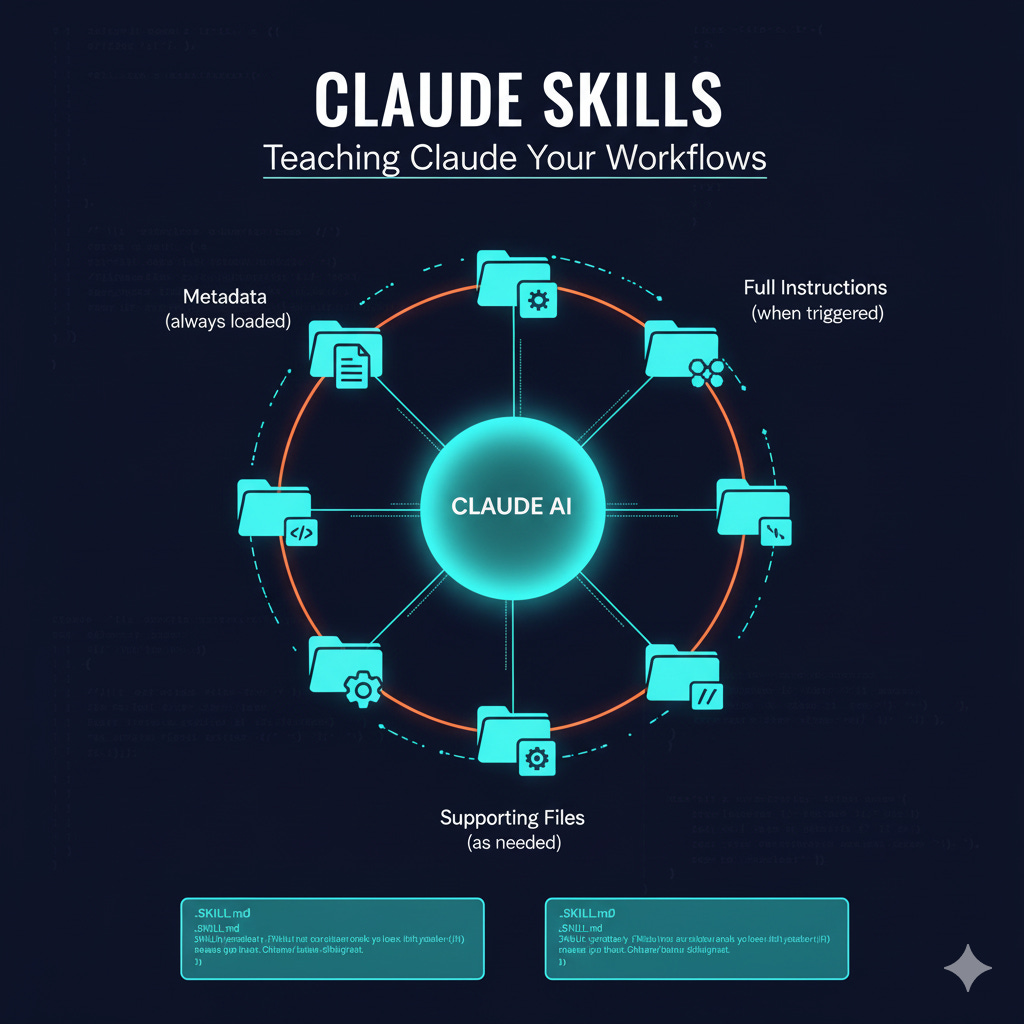
This is the key architectural decision: Skills use progressive disclosure across three levels:
Metadata (name/description) - always loaded
Full instructions (SKILL.md content) - loaded when triggered
Supporting files - accessed as needed
How Claude Triggers Skills
Skills are model-invoked. Claude decides when to use them based on matching your request to the skill descriptions in its system prompt.
Ask Claude to “create a sales presentation following our brand guidelines” and it might load two Skills: one for presentation creation, another for your brand standards. You don’t manually select anything.
You’ll see Skills activate in Claude’s thinking process. The interface shows “Reading [skill-name]” when Claude loads one.
Skills Include Executable Code
Here’s where Skills get powerful: they can bundle pre-written scripts.
Large language models can sort a list by generating tokens, but it’s wildly inefficient compared to running a sorting algorithm. Skills let you provide that algorithm.
Example from Anthropic’s PDF Skill: Claude can execute a Python script that extracts form fields from a PDF without loading either the script or the PDF into its context window. The code runs deterministically, giving consistent results every time.
This is why Skills require code execution capability. They’re not just instructions - they’re tools Claude can invoke.
Skills Work Everywhere
Build a Skill once, use it across:
Claude.ai (web app): Pro, Max, Team, Enterprise plans
Claude API: Via the
/v1/skillsendpointClaude Code: Automatically available when installed
The same Skill folder works in all three environments without modification.
Creating Your First Skill
Anthropic built a “skill-creator” skill that generates Skills for you:
Enable Skills in Settings > Capabilities
Describe your workflow to Claude
Claude interviews you, asks clarifying questions
Generates the folder structure and SKILL.md
Bundles any resources you need
No manual file editing required.
For manual creation:
my-skill/
├── SKILL.md          # Instructions with frontmatter
├── scripts/          # Optional executables
│   └── helper.py
└── resources/        # Optional supporting files
    └── template.json
Skills Compose Automatically
Multiple Skills can work together. Claude identifies which Skills are needed and coordinates their use.
Request a financial model with your company’s formatting standards? Claude might load:
Excel manipulation Skill
Your financial modeling conventions Skill
Data validation Skill
All three work together without you specifying the combination.
Built-in Skills That Shipped
Anthropic’s document creation abilities (September 2025) were entirely Skills under the hood:
docx: Create/edit Word documents with tracked changes, comments, formatting
pdf: Extract text/tables, fill forms, merge/annotate PDFs
pptx: Generate slides, apply layouts, use templates
xlsx: Spreadsheet manipulation with formulas, charts, data transformations
These are now available in Anthropic’s public GitHub repo at anthropics/skills.
Other example Skills they released:
slack-gif-creator: Generate animated GIFs optimized for Slack’s size constraints
theme-factory: Apply consistent styling across artifacts (slides, docs, reports)
Real-World Skill Examples
The community is building Skills for everything:
Data journalism (Simon Willison’s examples):
Where to get US census data and how to structure it
Loading various formats into SQLite/DuckDB
Publishing data as Parquet files in S3
Experienced reporter guidance on finding stories in datasets
Development workflows:
TDD patterns for specific frameworks
Code review standards
Security scanning configurations
Deployment procedures
Business processes:
Internal communications templates
Status report formatting
Compliance checking procedures
Brand guideline enforcement
Token Efficiency in Practice
Before Skills, you might front-load 5,000+ tokens of context about your workflows. With Skills:
Metadata phase: 30-50 tokens per Skill
Triggered phase: Only loads when needed
Active phase: Accesses resources on-demand
This means you can make dozens of Skills available without bloating your context window.
Compare to Model Context Protocol (MCP): GitHub’s MCP alone consumes tens of thousands of tokens just describing its capabilities. Add several MCPs and you’ve burned most of your context before doing actual work.
Skills vs MCP: What’s Different
MCP (Model Context Protocol) and Skills solve related problems differently:
MCP: Defines how Claude connects to external tools. Think database connections, API clients, data sources. Front-loads all capabilities into context.
Skills: Package procedural knowledge and domain expertise. Load progressively as needed. Can include code that runs outside the context window.
They’re complementary: A Skill could use an MCP server to access data, then apply domain expertise to analyze it. The mcp-builder Skill helps create MCP integrations.
Key advantage of Skills: they’re not Claude-specific. Any LLM with filesystem access and code execution could read SKILL.md and follow the instructions. Skills are just well-structured documentation with optional automation.
Claude Code Plugins: Extensible Development Environments
What Plugins Package
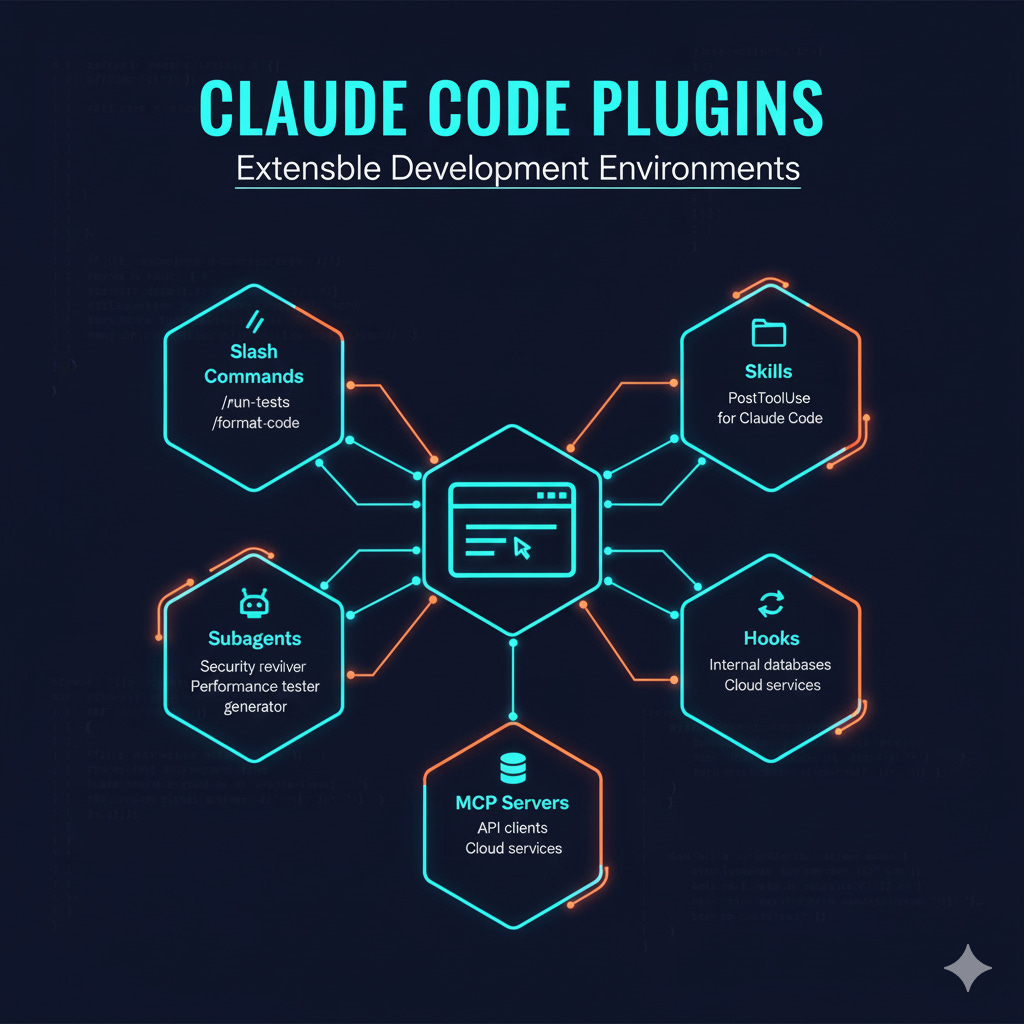
While Skills work across Claude’s products, Plugins are specific to Claude Code (the terminal/IDE tool). They bundle any combination of:
Slash commands: Custom shortcuts for frequent operations
/deploy production
/run-tests integration
/format-codeSubagents: Specialized agents for specific tasks
Security reviewer
Performance tester
Documentation generator
MCP servers: Connect to tools via Model Context Protocol
Internal databases
API clients
Cloud services
Hooks: Event handlers that trigger automatically
PostToolUse: After Claude uses any tool
PreCompact: Before conversation history compacts
SessionStart: At session beginning
Skills: Yes, Plugins can include Skills for Claude Code
Plugin Installation Flow
Installing a plugin is a single command:
/plugin marketplace add anthropics/claude-code
/plugin install feature-dev
The plugin marketplace system is decentralized. Anyone can create a marketplace by:
Creating a git repository
Adding
.claude-plugin/marketplace.jsonSharing the repo
No Anthropic approval needed. No centralized app store.
Plugin Structure
enterprise-plugin/
├── .claude-plugin/
│   └── plugin.json       # Metadata
├── commands/             # Slash commands
│   ├── deploy.md
│   └── test.md
├── agents/              # Subagents
│   ├── reviewer.md
│   └── tester.md
├── skills/              # Agent Skills
│   └── code-reviewer/
│       └── SKILL.md
├── hooks/               # Event handlers
│   └── hooks.json
├── .mcp.json           # MCP servers
└── scripts/            # Hook scripts
    └── validate.sh
The plugin.json manifest defines metadata:
{
  “name”: “deployment-tools”,
  “version”: “1.0.0”,
  “description”: “Deployment automation for production”,
  “author”: {
    “name”: “DevOps Team”
  }
}
Plugins Toggle On/Off
Unlike always-loaded configurations, plugins can be:
Enabled when needed
Disabled to reduce system complexity
Uninstalled completely
This matters for performance. Enable your deployment plugin during releases, disable it during feature development.
Plugin Marketplaces Are Already Proliferating
Notable early marketplaces:
Dan Ávila’s collection:
DevOps automation
Documentation generation
Project management
Testing suites
Seth Hobson’s repository:
80+ specialized sub-agents
Various development workflows
Instantly available via plugins
Anthropic’s official marketplace (anthropics/claude-code):
PR review agents
Security guidance hooks
Feature development workflows
Plugin creation tools
Hooks: The Automation Layer
Hooks let you trigger actions at specific workflow points.
Example: Auto-format code after Claude writes or edits files:
{
  “hooks”: {
    “PostToolUse”: [
      {
        “matcher”: “Write|Edit”,
        “hooks”: [
          {
            “type”: “command”,
            “command”: “${CLAUDE_PLUGIN_ROOT}/scripts/format-code.sh”
          }
        ]
      }
    ]
  }
}
Available events:
PreToolUse / PostToolUse
UserPromptSubmit
SessionStart / SessionEnd
SubagentStop
PreCompact
Team Distribution Strategy
For enterprise teams, plugins solve the “standardization problem”:
Create private marketplace in your git repo
Define required plugins in
.claude/settings.jsonTeam members trust the repo folder
Plugins install automatically for everyone
Now your entire team has:
Same code formatting rules
Same testing procedures
Same deployment workflows
Same security checks
Without manual setup or documentation.
Plugin Use Cases
Engineering leaders: Enforce code review standards, testing requirements, security scans
Open source maintainers: Provide commands that help developers use packages correctly
Framework authors: Bundle best practices, setup procedures, common workflows
DevOps teams: Share deployment pipelines, environment configurations, monitoring setup
Security teams: Distribute security scanning tools, compliance checks, audit procedures
Skills vs Plugins: When to Use Each
Feature Skills Plugins Scope All Claude products Claude Code only What they package Domain expertise, instructions, scripts Commands, agents, hooks, MCPs, Skills Activation Model-invoked (automatic) Varies by component type Use case Teaching Claude how to do tasks Extending Claude Code environment Distribution GitHub repos, API endpoints Decentralized marketplaces Management File system or API /plugin commands
Use Skills when:
You need capabilities across web, API, and Claude Code
You’re packaging domain expertise
You want Claude to automatically detect when to use them
Token efficiency is critical
Use Plugins when:
You’re specifically working in Claude Code
You want to bundle multiple extension types
You need team distribution via marketplaces
You’re building development workflows
Use both when:
Building comprehensive team environments
Skills provide the “what to do”
Plugins provide the “when and how to do it”
Getting Started: Practical Steps
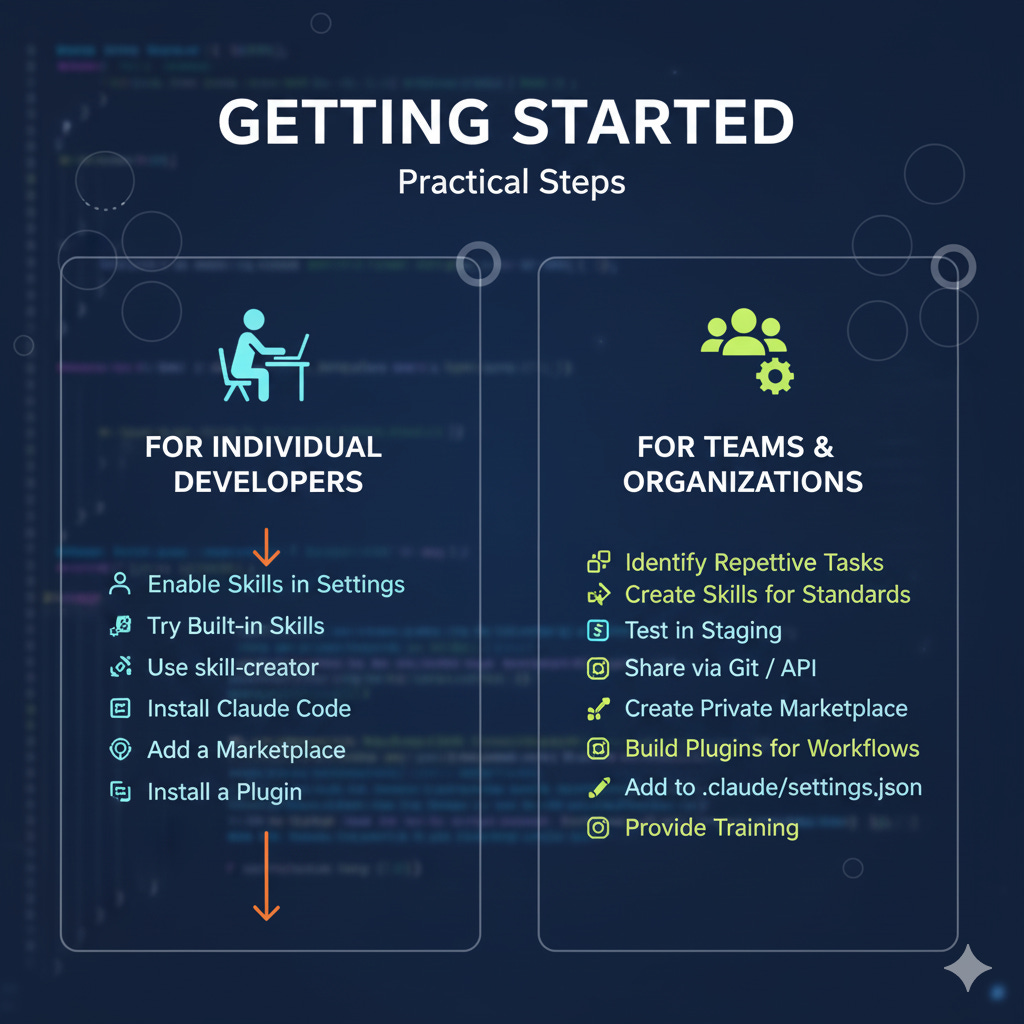
For Individual Developers
Starting with Skills:
Enable in Settings > Capabilities > Skills
Try built-in Skills (create an Excel file, fill a PDF)
Browse
anthropics/skillsrepo for examplesUse skill-creator to make your first custom Skill
Starting with Plugins:
Install Claude Code if you haven’t
Add a marketplace:
/plugin marketplace add anthropics/claude-codeBrowse available:
/pluginInstall one:
/plugin install feature-devTry the new commands/agents
For Teams
Skills rollout:
Identify repetitive tasks that need domain knowledge
Create Skills for brand standards, templates, processes
Test in staging/dev environments
Share via git repos or API endpoints
Document for team members
Plugins rollout:
Create private marketplace in team git repo
Build plugins for common workflows
Test with small group
Add to
.claude/settings.jsonfor auto-installProvide training on custom commands
For Organizations
Enterprise considerations:
Security: Audit Skill code before deployment
Governance: Establish approval process for new Skills
Distribution: Central repository vs decentralized
Maintenance: Version management, update procedures
Training: Documentation and onboarding materials
Current limitation: Claude.ai doesn’t support centralized admin management of custom Skills. Teams must coordinate distribution manually.
Community Response and Emerging Ecosystem
Week One Momentum
The community response has been chaotic in the best way:
Simon Willison (data journalist, developer):
“Maybe a bigger deal than MCP”
“The potential applications of this trick are dizzying”
Skills make Claude Code’s role as a general automation agent obvious
Ethan Mollick (AI researcher):
“Both an easy path for workable agents and a step forward in what AI can do”
Developer feedback:
“Claude didn’t just get smarter, it got specialized”
“Skills shrink the gap between ‘idea’ and ‘working agent’”
“This week feels different”
Problems People Hit in Week One
Common issues from community discussions:
Skill discovery: Claude not triggering Skills consistently
Solution: Make descriptions more specific and task-oriented
Test by explicitly mentioning skill-related keywords
Path configuration: Scripts not executing correctly
Solution: Use
${CLAUDE_PLUGIN_ROOT}environment variableEnsure scripts are executable (
chmod +x)
Token efficiency expectations: Skills still consuming more context than expected
Reality: Progressive disclosure works, but Skills aren’t zero-cost
Optimize by keeping SKILL.md focused
Team coordination: No built-in sharing mechanism in Claude.ai
Workaround: Share Skills via git repos
Use API for programmatic management
One developer compiled “10 tools to help build real Skills” after watching 100+ people hit the same problems. The community is already creating meta-tools.
Growing Repositories
Curated collections emerging:
anthropics/skills: Official examplesBehiSecc/awesome-claude-skills: Community-curated practical Skillsobra/superpowers: 20+ battle-tested Skills for Claude Codetravisvn/awesome-claude-skills: Comprehensive resource list
Specialty Skills being built:
Scientific computing with specialized libraries
Web security and penetration testing tools
Data journalism and analysis workflows
Financial modeling and reporting
Legal document processing
Security Considerations You Can’t Ignore
Code Execution Risk
Both Skills and Plugins can execute code on your machine. This is powerful but dangerous.
Skills risk profile:
Scripts run with your user permissions
Can access filesystem, network, system resources
Malicious Skills could exfiltrate data
Prompt injection could trigger unintended Skill execution
Plugins risk profile:
Hooks run automatically on events
Can modify files without explicit approval
MCP servers can connect to external services
Subagents operate with delegated authority
Anthropic’s Guidance
“Install skills only from trusted sources” - Anthropic documentation
What “trusted” means:
Audit the code before installation
Check dependencies and external connections
Review what permissions are needed
Understand what data is accessed
Practical Security Steps
Before installing any Skill or Plugin:
Read the SKILL.md or plugin.json
Examine all scripts in the skills/ or scripts/ folders
Check for network connections or external APIs
Verify the source is reputable
Test in isolated environment first
For organizations:
Maintain approved Skills/Plugins list
Require security review for new additions
Use version control for auditability
Monitor for prompt injection attempts
Implement least-privilege access where possible
Sandboxing limitations: Current implementations don’t fully sandbox execution. A malicious Skill with prompt injection could:
Access your filesystem
Make network requests
Execute arbitrary commands
Exfiltrate sensitive data
This is the tradeoff for power. Skills aren’t chatbot extensions - they’re automation tools with system access.
Technical Deep Dive: How Progressive Disclosure Works
Token Budget Allocation
Standard Claude conversation might look like:
System prompt: 2,000 tokens
User message: 500 tokens
Conversation history: 3,000 tokens
Available for response: 194,500 tokens (200k total)
With Skills/Plugins:
System prompt: 2,000 tokens
Skill metadata (10 Skills × 40 tokens): 400 tokens
User message: 500 tokens
Conversation history: 3,000 tokens
Available for response: 194,100 tokens

[User triggers Skill]

Loaded SKILL.md: 2,000 tokens
Available for response: 192,100 tokens
Only when Claude loads the full Skill do you pay the token cost.
Skill Triggering Mechanism
Claude matches user requests against Skill descriptions using semantic similarity. The system prompt includes:
Available skills:
- name: financial-modeling
  description: Create Excel financial models with sensitivity analysis
- name: brand-guidelines
  description: Apply company brand standards to documents and presentations
- name: data-validation
  description: Validate data quality and completeness before analysis
User request: “Build me a financial model for a SaaS company”
Claude’s reasoning:
Scan available Skill descriptions
Match “financial model” → financial-modeling Skill
Load financial-modeling/SKILL.md into context
Execute instructions
The description quality directly impacts triggering reliability. Be specific about when the Skill should activate.
Script Execution Flow
When a Skill includes executable scripts:
Claude identifies script is relevant
Invokes script with necessary parameters
Script runs in system environment (not in context)
Returns results to Claude
Claude incorporates results in response
This is why the PDF form-filling example works efficiently. The Python script extracts form fields without consuming context tokens for the PDF contents.
Composition Coordination
When multiple Skills activate:
# Pseudocode of Claude’s coordination
user_request = “Create branded quarterly financial report”

matching_skills = [
    “financial-modeling”,
    “brand-guidelines”,
    “report-generation”
]

for skill in matching_skills:
    load(skill.SKILL_md)

results = financial_modeling.execute(data)
styled_results = brand_guidelines.apply(results)
final_report = report_generation.create(styled_results)
Claude coordinates the sequence. You don’t specify the orchestration.
Comparison to Other AI Customization Approaches
Skills vs Custom Instructions
Custom Instructions (built into Claude):
Always loaded into every conversation
General behavioral guidance
Limited to text, no code execution
Good for: tone, format preferences, interaction style
Skills:
Loaded only when triggered
Task-specific expertise
Can include executable code
Good for: repeatable workflows, domain knowledge
Use both: Custom instructions for how you want Claude to interact, Skills for what you want Claude to do.
Skills vs Projects
Projects (Claude.ai feature):
Accumulate context over time
Contain conversation history
Include uploaded documents
Scoped to specific work
Skills:
Portable across all conversations
No conversation history
Procedural knowledge only
Available everywhere
Use both: Projects for ongoing work with accumulated context, Skills for procedures you want available everywhere.
Plugins vs Cursor Rules
Cursor (IDE with AI):
.cursorrulesfile defines project-specific guidanceAlways loaded for that project
Text-based instructions only
Claude Code Plugins:
Modular, toggle on/off
Can include code, agents, MCP servers
Distributable via marketplaces
Hooks for automated responses
Plugins are significantly more powerful but require Claude Code.
What Makes This Different From Previous Attempts
Why Skills Succeed Where GPT Actions Failed
GPT Actions (ChatGPT’s plugin system):
Centralized marketplace
Required approval process
Focused on API integrations
User had to explicitly invoke actions
Skills:
Decentralized distribution
No approval needed
Focused on procedural knowledge
Model autonomously invokes
The decentralized approach removes distribution friction. The automatic invocation removes cognitive load.
Why Plugins Avoid MCP’s Complexity
MCP (Model Context Protocol):
Front-loads all capabilities
Complex server setup
Protocol-level integration
High token overhead
Plugins:
Progressive disclosure
Simple folder structure
Multiple extension types
Efficient token usage
Plugins embrace simplicity over protocol perfection.
Future Implications and What’s Coming
Announced Improvements
Anthropic stated they’re working on:
Simplified Skill creation workflows
Enterprise-wide deployment capabilities
Easier organization-wide distribution
Improved team coordination tools
Current gap: No centralized admin management in Claude.ai for custom Skills. Coming soon.
Ecosystem Predictions
Based on community momentum:
Skill marketplaces: Within 3-6 months, expect curated Skill marketplaces similar to npm or pip. Quality ratings, dependency management, versioning.
Industry-specific Skill libraries: Healthcare, legal, finance, education sectors will build domain-specific Skill collections. Compliance and regulatory Skills will be huge.
Skill composition frameworks: Tools to help Skills coordinate better. Dependency management. Skill testing frameworks.
Cross-model compatibility: Since Skills are just markdown + scripts, expect other AI tools to adopt compatible formats. Skills becoming a de facto standard.
Security tooling: Skill analysis tools, sandboxing improvements, permission systems.
Competitive Pressure
Other AI companies are watching. Expect:
OpenAI to enhance GPT Actions with progressive disclosure
Google to add similar capabilities to Gemini
Microsoft to integrate into Copilot
Open source alternatives to emerge
Skills and Plugins give Anthropic a distribution moat. If your team’s productivity depends on 50+ custom Skills, switching models means rebuilding everything.
Common Questions
Q: Can I use Skills without a paid plan? Skills are available on Pro ($20/month), Max ($100-200/month), Team, and Enterprise plans. Free tier doesn’t currently include Skills.
Q: Do Skills work offline? Skills require Claude’s API or Claude Code. The scripts can run locally, but Claude needs connectivity to trigger and coordinate Skills.
Q: Can I sell Skills? No official marketplace for paid Skills yet. Anthropic mentioned potential future marketplace. Currently Skills are shared via git repos.
Q: How do I update a Skill? For manual installations, replace the Skill folder. For git repositories, pull latest changes. For API-managed Skills, use version controls in the Console.
Q: Are Skills compatible with other AI models? Skills are conceptually model-agnostic (just markdown instructions), but require:
Filesystem access
Code execution capability
Tool to read and interpret SKILL.md
Any LLM with these capabilities could theoretically use Skills.
Q: What’s the difference between a Skill and a Plugin? Skills work across all Claude products (web, API, Claude Code). Plugins are Claude Code-specific and bundle multiple extension types (commands, agents, hooks, MCPs, Skills).
Q: How many Skills can I have installed? No official limit stated, but practical limit is token efficiency. With 30-50 tokens per Skill metadata, you could have 100+ Skills before context becomes an issue.
Q: Do Skills persist between conversations? Skills remain installed but don’t carry conversation state. Each conversation triggers Skills independently based on the current request.
Measuring Real-World Impact
Early anecdotal evidence suggests significant time savings:
Document creation: Teams report 60-70% reduction in time formatting documents according to brand guidelines using Skills.
Code review: Plugins with custom review hooks catching issues before human review, reducing back-and-forth by 40%.
Onboarding: New developers getting up to speed 2-3x faster with team-specific Skill packages.
Consistency: Near 100% compliance with standards when Skills enforce them automatically vs ~60% with manual documentation.
These are early-stage claims. We need longitudinal studies. But the direction is clear: packaging expertise into reusable, automatable formats works.
What This Means for You
If you’re an individual developer: Start with built-in Skills. Test document creation, file manipulation. Then create a Skill for your most repetitive task. Even simple Skills save hours over time.
If you’re leading a small team: Create 3-5 Skills for your most common workflows. Share via git repo. Measure time savings. Expand based on highest ROI.
If you’re in a large organization: Start pilot program. Security review process. Approved Skill library. Gradual rollout with training. Plan for 6-12 month adoption curve.
If you’re building tools: Skills and Plugins are distribution channels. Package your expertise as Skills. Reach Claude’s entire user base. No approval process.
Bottom Line
Claude Skills and Plugins solve a real problem: how to give AI assistants domain expertise without burning your context window.
Skills package knowledge as folders with instructions and scripts. They work everywhere Claude does. Claude loads them automatically when relevant. Token-efficient through progressive disclosure.
Plugins extend Claude Code with commands, agents, hooks, and MCP servers. Distributable via decentralized marketplaces. Toggle on/off as needed.
Both are simple enough that the barrier to creation is low. Both are powerful enough that the community is building rapidly.
The skeptical view: these are just files in folders. Nothing revolutionary.
The optimistic view: making expertise portable, composable, and automatable is exactly what AI agents need to move from toys to tools.
One week after launch, the community is building. Marketplaces are proliferating. Skills are being shared. The ecosystem is forming.
Whether Skills become a de facto standard or fade away depends on execution. But the core insight - progressive disclosure of procedural knowledge - is sound.
And unlike many AI features, these solve an actual problem developers face daily.
Resources:
Official Skills repo: github.com/anthropics/skills
Claude Code plugins: github.com/anthropics/claude-code/tree/main/plugins
Documentation: docs.anthropic.com/en/docs/build-with-claude/agent-skills
Community collections: github.com/travisvn/awesome-claude-skills
Pricing:
Skills: Included in Pro, Max, Team, Enterprise plans
Plugins: Free for all Claude Code users
Claude Code: Free CLI tool (usage limits apply to underlying Claude API calls)
Claude Skills and Plugins demonstrate a practical leap in AI tooling by making procedural knowledge portable and token-efficient, showing how automation can now be both specialized and context-aware across workflows.
Love Claude ! Thanks for sharing