

Claude Code Workflows Are Here. Don’t Use Them Like an Intern Swarm.
More agents is not the point. The value is cleaner context, bounded roles, and deterministic review gates.

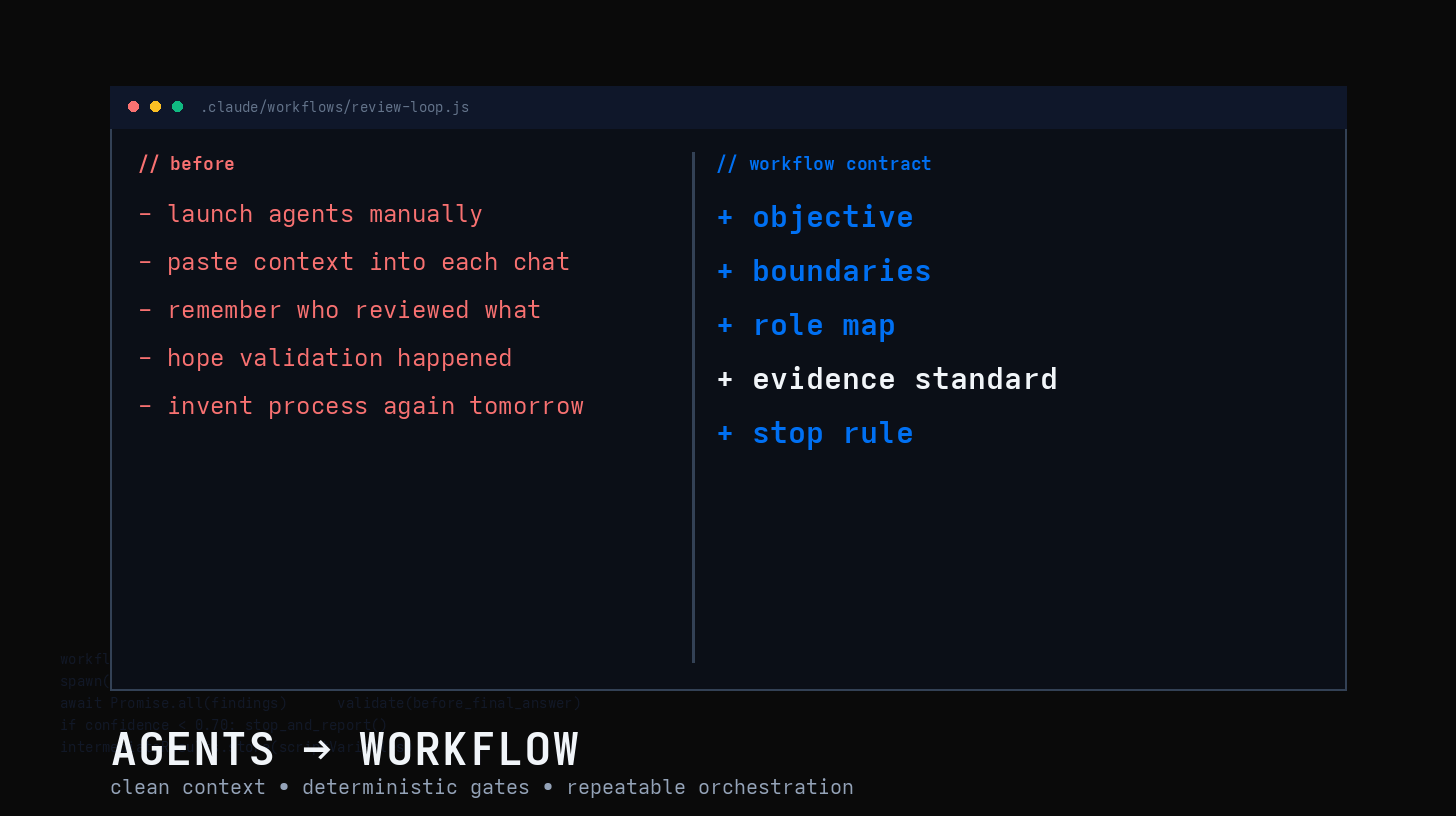
I wanted more agents.
That was the wrong goal.
What I actually wanted was a more deterministic way to coordinate agents: clean context, focused roles, parallel work without one giant conversation turning into sludge, and a process I could inspect before trusting it.
Manually launching agents worked at first. I could send one agent to review facts, one to check structure, one to test a hypothesis, and one to clean up the final draft. The context stayed cleaner than a single bloated chat. Each agent saw the slice it needed.
But I was babysitting the system.
Every run became a new ritual. I would invent the process again. Which agents? In what order? Who reviews? Who writes? What counts as evidence? When do we stop? Skills and commands helped, but the plan still lived in my head or in Claude’s context window.
The failure mode was subtle. The agents usually produced something useful. Then I had to remember whether the fact reviewer had checked source links, whether the structure reviewer had looked at the final version or the first draft, whether the fixer had expanded scope, and whether anyone had run the actual validation command.
That is not a system. That is me acting as the scheduler, QA lead, and memory layer for a pile of smart workers.
Claude Code’s new Dynamic Workflows fix a real problem: they move orchestration out of vibes and into a script you can inspect, rerun, and improve.
Claude can help design a deterministic plan for using agents with clear roles, clean context, review gates, and evidence requirements.
That is the part builders should care about.
What Claude Dynamic Workflows actually are
Anthropic introduced Dynamic Workflows in Claude Code on May 28, 2026.
The feature is in research preview. Anthropic’s launch post says it is available in Claude Code CLI, Desktop, and the VS Code extension for Max, Team, and Enterprise plans, with Enterprise controlled by admin settings.
The simple version:
You describe a complex task.
Claude writes a JavaScript orchestration script.
The workflow runtime executes that script in the background.
The script fans work out across subagents.
Intermediate results stay in script variables.
Claude receives the coordinated final result.
That last detail matters.
In normal subagent work, Claude is still the orchestrator turn by turn. It decides what to spawn next. Results flow back into the conversation. The plan lives in the context window.
In a workflow, the plan moves into code.
Anthropic’s workflow docs put it plainly: a dynamic workflow is a JavaScript script that orchestrates subagents at scale. Claude writes the script for the task you describe, and a runtime executes it while your session stays responsive.
That changes the shape of the work.
Subagents: Claude coordinates turn by turn
Skills: Claude follows instructions in context
Agent teams: lead agent supervises peer sessions
Workflows: script controls the orchestration
This is the important distinction. Subagents give you delegation. Skills give you instructions. Workflows give you repeatable orchestration.
The wrong way to read the announcement
The obvious reaction is: “Great. Now I can throw 100 agents at my repo.”
That is how you get an expensive mess.
Dynamic Workflows can run many subagents in parallel. Anthropic says they are built for codebase-wide bug hunts, large migrations, optimization audits, security reviews, and plans you want stress-tested before committing to them. Their launch post says workflows can run for hours or days, save progress, and resume after interruption.
That is powerful.
It is also exactly why the workflow matters more than the agents.
More agents means more independent context. Good.
More agents also means more ways to duplicate work, chase false positives, over-edit, miss shared constraints, or hallucinate confidence. Bad.
The control layer is the product.
Anthropic’s older agent guidance from Building effective agents still applies: the best implementations use simple, composable patterns rather than complex frameworks. Dynamic Workflows do not change that principle. They make it more important.
The better question is: “What process should coordinate the agents?”
My framework: The Workflow Contract
Before I use a workflow, I want five things defined.
I call this the Workflow Contract.
1. Objective
2. Boundaries
3. Role map
4. Evidence standard
5. Stop rule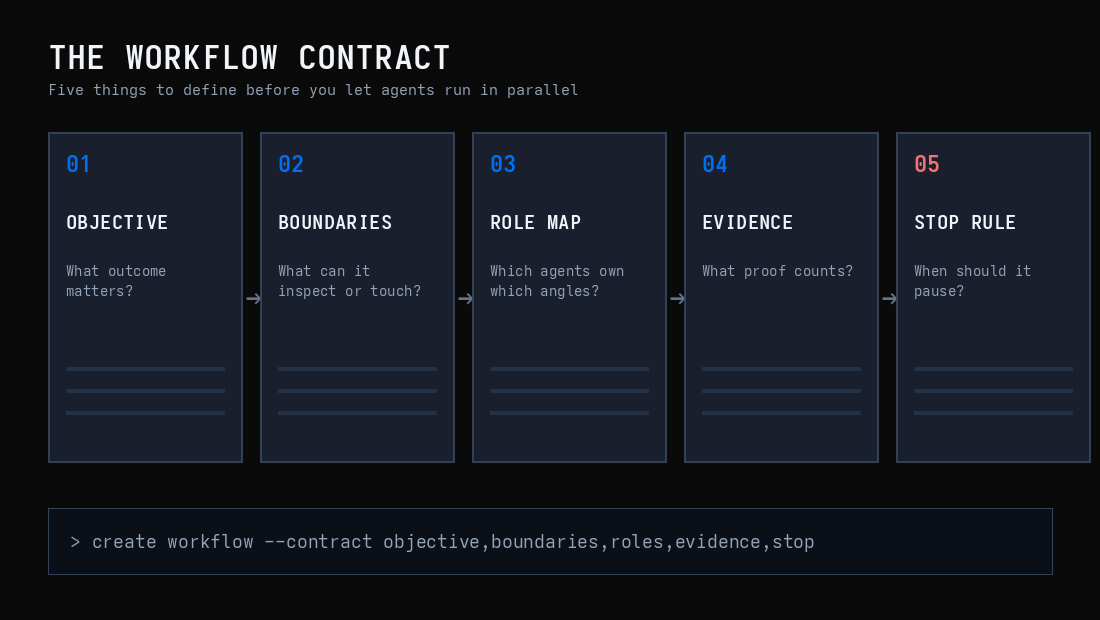
If those five pieces are vague, the workflow will be vague. If they are clear, Claude can turn them into a plan you can review.
Objective is the outcome: “identify why checkout tests are flaky and propose the smallest safe fixes,” not “improve the codebase.”
Boundaries define where the workflow can inspect and what it can touch.
Role map defines the independent angles, because clean context only matters if each context has a job.
Evidence standard defines what counts as a valid finding: file path, test name, command output, reproduction steps, source link, or diff summary.
Stop rule tells the workflow when not to continue: missing credentials, low confidence, reviewer disagreement, or a change that needs approval.
That is the difference between agent automation and agent governance.
When to use workflows instead of normal Claude Code
Use a workflow when the task benefits from parallel clean context or repeatable coordination.
Do not use one because the task feels important.
Here is my decision rule:
Use normal Claude Code when the task is small and sequential.
Use subagents when you need a few independent perspectives.
Use a workflow when the orchestration itself needs to be repeatable.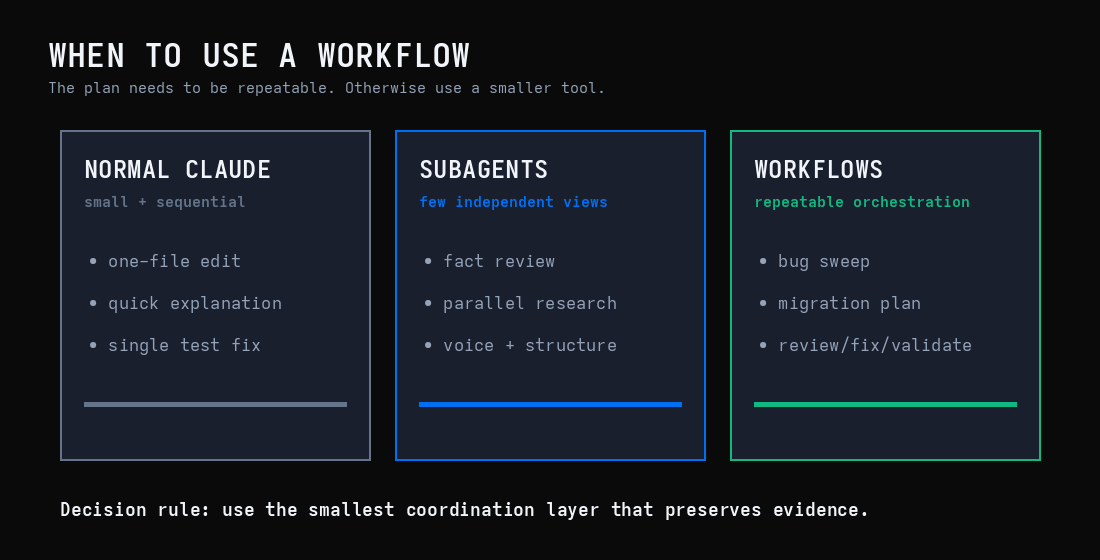
Good workflow tasks:
• codebase-wide bug sweeps
• migration planning across many files
• security audits with independent verification
• performance investigations by subsystem
• architecture reviews from several angles
• research where sources need to be cross-checked
• review/fix/validate loops that should run the same way every time
Bad workflow tasks:
• one-file edits
• vague “make this better” requests
• product decisions with unclear tradeoffs
• tasks that require private credentials inside agent context
• anything where you cannot define evidence
The cost matters too. Anthropic explicitly notes that Dynamic Workflows can consume substantially more tokens than a typical Claude Code session. The same post says the first time a workflow triggers, Claude Code shows what is about to run and asks for confirmation. That is the right default.
If the workflow does not save coordination cost, verification cost, or context cost, do not use it.
Here are three contracts I would start with.
Recipe 1: Bug triage workflow
Bug triage is perfect because the work is naturally parallel. Different failure modes can be investigated independently, then synthesized.
Prompt:
Create a dynamic workflow to triage these failing tests.

Objective:
Identify the root cause of the failures and propose the smallest safe fix for each.

Boundaries:
Inspect test files, test helpers, and directly related implementation files.
Do not edit production code yet.
Do not change test expectations unless you can prove the current expectation is wrong.

Role map:
- Agent 1: timing and async behavior
- Agent 2: mocks and fixtures
- Agent 3: database or state cleanup
- Agent 4: recent git diff and ownership of changed behavior
- Reviewer agent: challenge each proposed root cause

Evidence standard:
Each finding must include failing test name, file path, suspected root cause, reproduction command, and smallest fix.

Stop rules:
Stop if the fix requires a product decision.
Stop if agents disagree on root cause.
Stop if reproduction fails locally.

Output:
Return a ranked triage report. No code changes.
This is much better than “fix my tests.”
“Fix my tests” lets the agent optimize for green output. The workflow contract forces diagnosis first.
That one shift prevents a lot of bad AI coding behavior.
Recipe 2: Migration planning workflow
Migrations are where single-agent context gets ugly. The agent starts strong, then the edge cases pile up: API surface, tests, data model, deployment risk, backward compatibility, documentation, rollback.
A workflow can split those angles cleanly.
Prompt:
Create a dynamic workflow to plan a migration from [OLD SYSTEM] to [NEW SYSTEM].

Objective:
Produce a phased migration plan with risks, dependencies, and rollback points.

Boundaries:
Planning only. Do not edit files.
Inspect code, tests, configs, docs, and recent commits related to the old system.

Role map:
- API surface agent: find public interfaces and callers
- Data agent: identify schema, persistence, and migration risks
- Test agent: identify coverage gaps and required regression tests
- Deployment agent: identify rollout, feature flag, and rollback concerns
- Docs agent: identify user-facing or internal docs to update
- Skeptic agent: challenge the plan and look for missing dependencies

Evidence standard:
Every claim must cite file paths or commands. Every phase must include validation.

Stop rules:
Stop before implementation.
Escalate if the migration requires a breaking API change.
Escalate if rollback is unclear.

Output:
Return a plan with phases, risk level, validation commands, and go/no-go checkpoints.
This is where workflows start to feel different from commands or skills.
A skill can tell Claude how to think about migrations. A command can package a repeatable prompt. A workflow can hold the intermediate results outside the main conversation and coordinate multiple agents until the plan converges.
That matters on work bigger than one context window.
Recipe 3: Review loop workflow
This is the workflow I care about most because claiming code is done is where agents lie to themselves.
A useful review loop has separate roles:
Writer -> Reviewers -> Fix worker -> Validators -> Final summary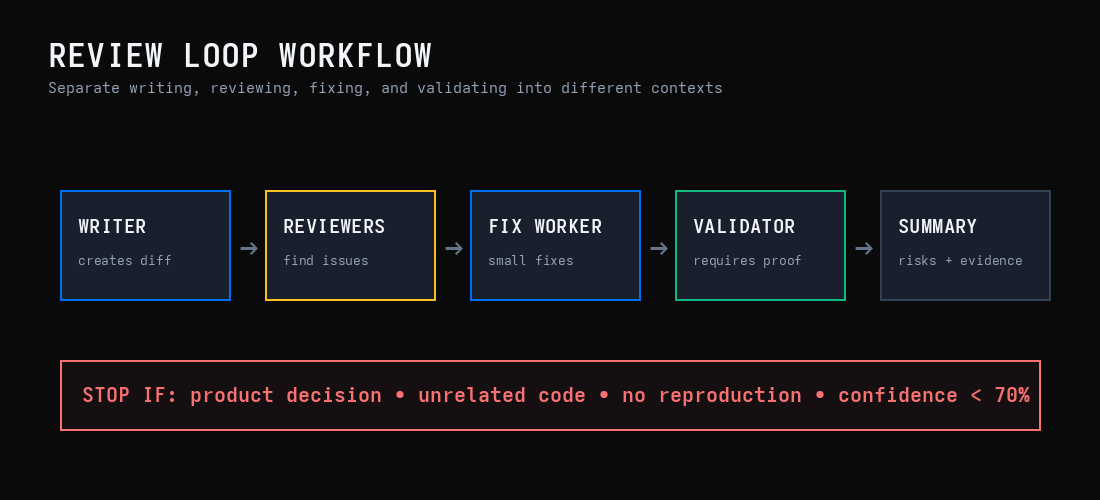
The writer should not be the only judge of success.
Prompt:
Create a dynamic workflow for a review/fix/validate loop on the current diff.

Objective:
Identify fixes worth doing now, apply only approved small fixes, and validate the final diff.

Boundaries:
Use the current git diff as scope.
Do not expand product scope.
Do not refactor unrelated files.

Role map:
- Correctness reviewer: find behavior bugs or regressions
- Simplicity reviewer: find overcomplication, duplication, or AI slop
- Test reviewer: find missing validation or weak assertions
- Fact/doc reviewer: verify documentation claims and source links if docs changed
- Fix worker: apply only synthesized accepted fixes
- Validator: inspect final diff and run targeted checks

Evidence standard:
Reviewers must provide file paths, line references where possible, severity, and smallest safe fix.
Validator must report commands run, exit codes, failures, and residual risks.

Stop rules:
Stop if reviewers raise a product decision.
Stop if a fix would touch unrelated code.
Stop after two fix rounds unless a blocker remains.

Output:
Return final diff summary, validation evidence, unresolved risks, and anything deferred.
This is the part people miss.
Claude can help enforce a process where writing, reviewing, fixing, and validating are separate jobs.
That separation reduces context contamination.
The writer wants the code to be correct. The reviewer wants to find what is wrong. The validator wants proof. Those are different mental modes. Put them in different contexts.
How I would use this tomorrow
I would not turn on `ultracode` and let every prompt become a workflow.
The docs say `ultracode` lets Claude decide when a task warrants a workflow. That can be useful, but it also uses more tokens and takes longer.
My default would be manual first.
Start with three saved workflows:
/bug-triage
/migration-plan
/review-loop
Use them enough to see where they fail. Then improve the contracts.
Claude’s workflow docs say saved workflows can live in `.claude/workflows/` for a project or `~/.claude/workflows/` for personal use. They can accept structured input through `args`, which means you can reuse the same orchestration with different target paths, issue numbers, or config objects.
That is the product shape I want.
Not “Claude, figure it out.”
More like:
Run /review-loop on this diff.
Use security and docs reviewers.
Max two fix rounds.
Do not edit auth behavior without approval.
That is how you turn agent work into operating procedure.
The operator takeaway
Dynamic Workflows are a coordination primitive.
They matter because AI coding is moving from single prompts to systems of work. The scarce skill is no longer “can I get Claude to write code?” Most builders can do that now.
The scarce skill is defining the work so agents do not drift.
Clean context helps. Focused agents help. Parallel work helps. But none of those matter if the process changes every time and the evidence standard is whatever Claude remembers in the moment.
The Workflow Contract fixes that:
Objective
Boundaries
Role map
Evidence standard
Stop rule
Start there.
Then ask Claude to design the workflow. Review the plan. Save the workflows that earn trust. Reuse them.
Do not use Dynamic Workflows like an intern swarm.
Use them like a deterministic coordination layer around unreliable intelligence.
That is the payoff.
The cost of a missing boundary is not theoretical. One undefined boundary turns a 10-minute review into a two-hour cleanup. One missing evidence standard turns a confident finding into another thing you have to verify manually. One missing stop rule lets an agent keep going after it has crossed from implementation into product decision.
That is why I care about the contract more than the launch hype. The workflow is only as good as the coordination rules inside it.
Pick one: which element is missing from your current agent setup: objective, boundaries, role map, evidence standard, or stop rule? Drop it below. I respond to every one. Also, make sure to share with others looking to learn how to actually use these new workflows well.
This hits the real shift: the value isn’t “more agents,” it’s moving the coordination layer out of improvisation and into something you can actually govern.
Most agent setups fail for the same reason human teams fail — the process is implicit. The plan lives in the operator’s head or in whatever the model remembers in the moment. That’s not orchestration. That’s vibes. I’ve been using a simple Workflow Contract to force determinism before anything runs: Objective, Boundaries, Role Map, Evidence Standard, Stop Rule.
When those pieces are explicit, the workflow becomes something you can inspect, trust, and reuse. When they’re vague, you end up babysitting a swarm of smart interns who all think they’re the lead engineer.
Dynamic Workflows finally give us a place to encode the contract instead of hoping the model keeps the whole process straight. That’s the real unlock, not parallelism, but predictable coordination.